

Xplane Scripting House · X-Plane 12
Blueprints for X-Plane
Xplane Scripting House brings node graphs and Lua scripts together in one add-on. Wire your logic visually, run it in the sim at once, and switch to Lua for what a graph can't do.
- Free
- Open source · MIT
- X-Plane 12
- Windows 10/11

Node graphs
A visual editor in the style of game-engine blueprints: events on the left, actions on the right, wires in between. Each graph is a plain .cmgraph file.
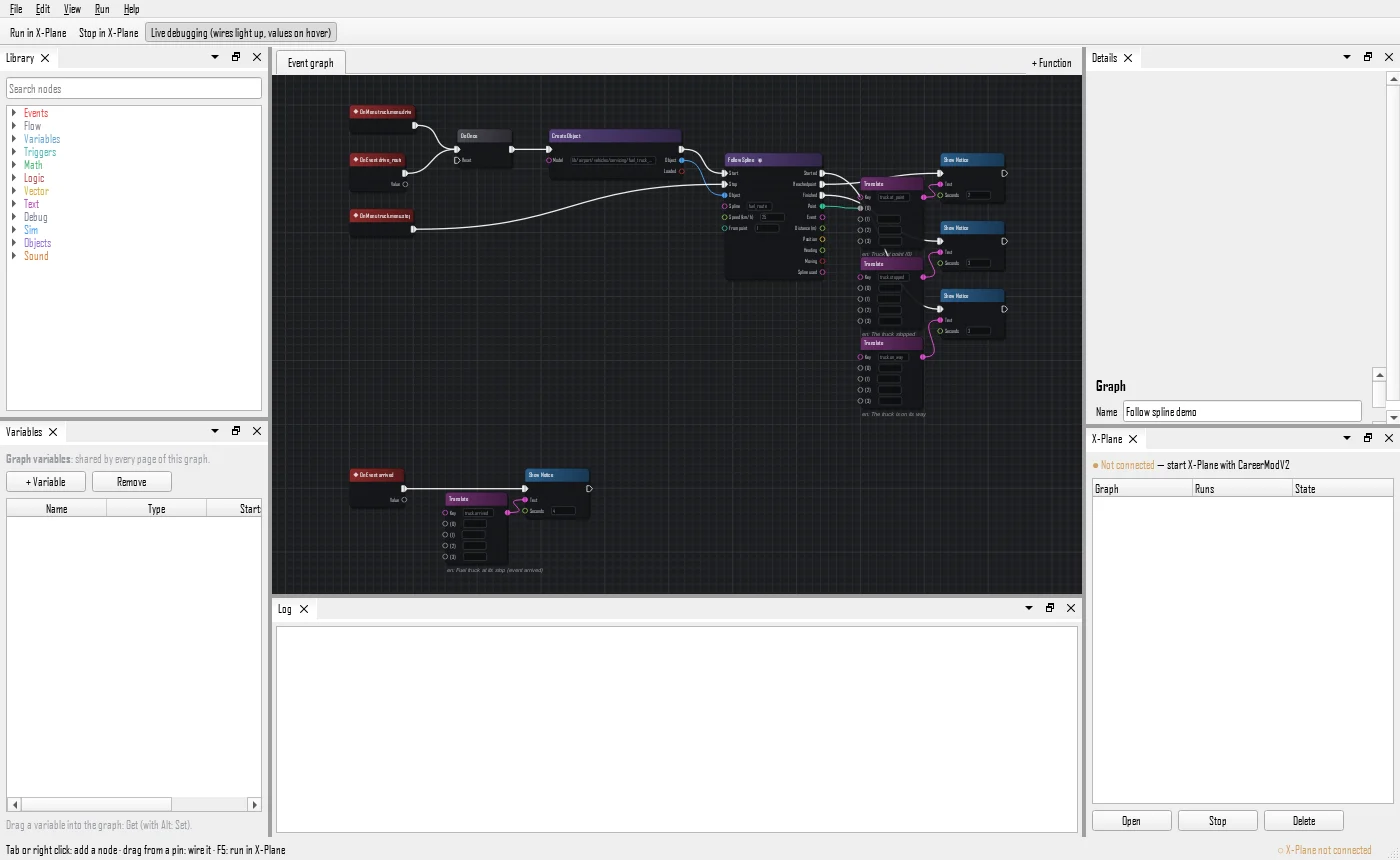
Run it in the sim
F5 sends the graph to X-Plane and runs it at once. F6 turns on live debugging: the wires light up as they fire, and values show on hover.
A library of nodes
Events, flow, variables, maths, logic, vectors, text, sim values and commands, objects, sounds and triggers. Press Tab or right-click to add one, drag from a pin to wire it.
Global or per scenery
Global graphs run on every flight. A scenery pack can carry its own graphs: they start when you come within 20 km of its airport and stop beyond 25 km.
Aware of the world
Follow Spline sends a vehicle along a World Editor 3D route, picked by name or by role. On Enter, On Exit and While Inside react to its trigger volumes.
Functions and tidy graphs
Collapse part of a graph into a function on its own page, call it from anywhere, and let Ctrl+L arrange the nodes.
Translated
Texts can be keys in a strings table, so a graph shows its notices in the pilot's language. English and French today.
Lua, when a graph isn't enough
LuaJIT 2.1 in a sandbox, for complex world events, aircraft systems and, later, cockpit screens.
- Event handlers, timers, and coroutines that can wait:
xsh.on,xsh.timer.every,xsh.wait. - Hot reload: save the file while X-Plane runs and it reloads within a second, keeping its saved state.
- Errors give the file and the line. A per-frame time budget and a watchdog stop a runaway loop before it freezes the sim.
- Safe by design: no FFI, a sandbox, and its own LuaJIT that never clashes with XLua or FlyWithLua.
-- scripts/hello.lua: runs on every flight,
-- and reloads as soon as you save it
local agl = xsh.dataref("sim/flightmodel/position/y_agl")

xsh.on("start", function(info)
    xsh.state.runs = (xsh.state.runs or 0) + 1
    xsh.notice("Hello from Lua (" .. xsh.state.runs .. ")", 0, 4)
end)

xsh.events.on("tow_coming", function()
    xsh.log("tow coming, " .. math.floor(agl.value) .. " m AGL")
end)Where it stands
Built in five steps, each one working in X-Plane before the next.
- The VM. LuaJIT, the sandbox, global scripts, hot reload, and the graphs running in XSH. Built and tested offline.
- The API. Datarefs, commands, time, world, objects, sounds, splines, translations, notices, menus, and help in VS Code.
- Graphs and Lua together. Graphs call Lua, events go both ways, shared variables.
- Aircraft systems. Per-aircraft scripts with their own datarefs and commands, and a helicopter example.
- Screens. A 2D drawing API for cockpit screens, and its editor.
Download
Not released yet. The first package comes once the Lua API is ready and tested in X-Plane.
Source code
A C++17 core with no X-Plane code in it, a static LuaJIT built without FFI, the graph core and its Qt 6 editor, and a thin X-Plane plugin.
Source code on GitHub: coming soon